F.lux: What Is It and Why You Need It?
Are you the type of person who frequently works and using computer at night or perhaps maybe watching a movie on your 4k screen or in your mobile devices, in a dim environment for long hours? You may be have not thought of this, but doing so, is unhealthy to your eyes.
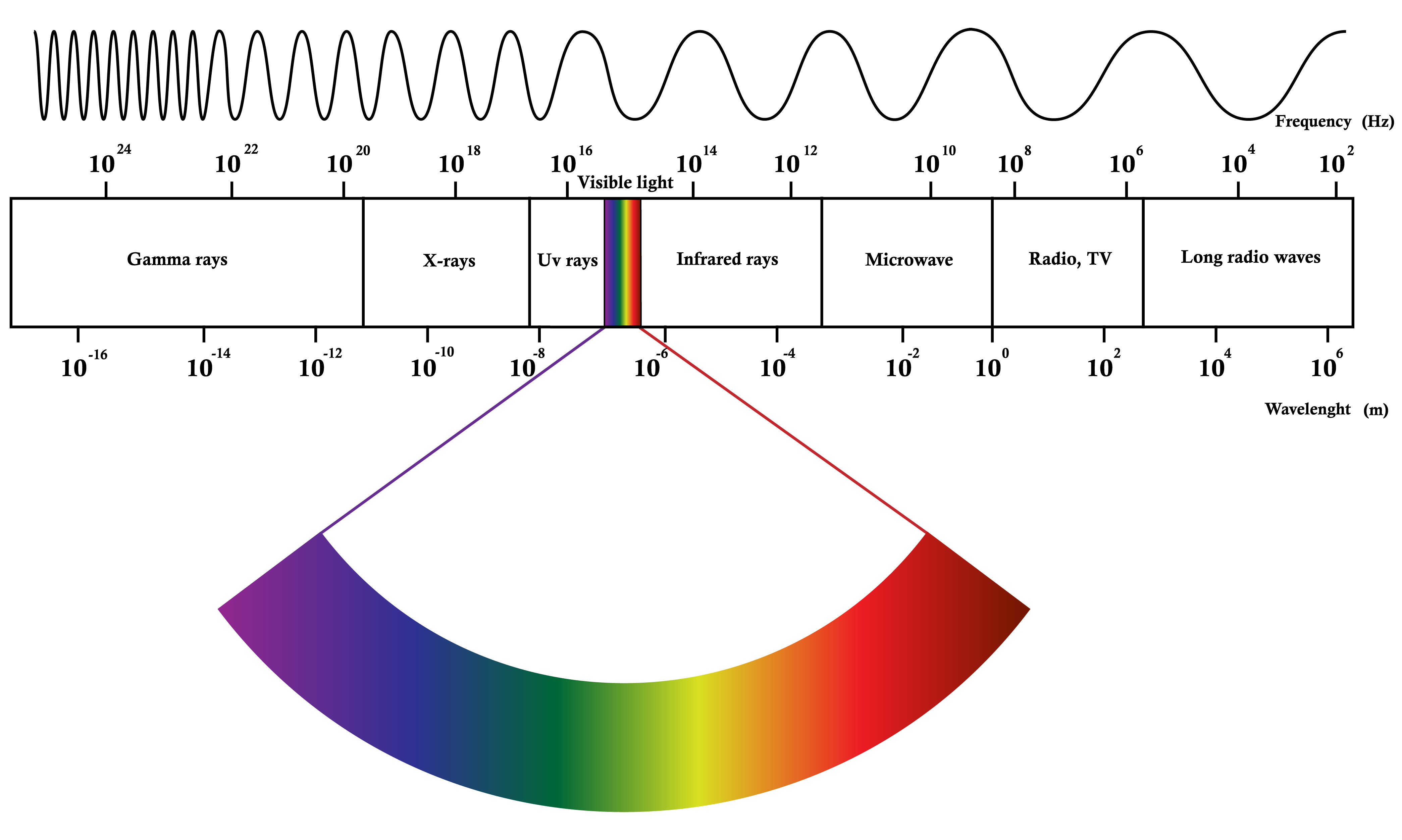
Technically speaking, our eyes can see light ranging from ~400 nm to ~700 nm in their wavelenghts. ~400 nm to ~500 nm is part of the blue light, which as shorter wavelengths. Shorter wavelengths means that these contains more energy. and > 500 are the other visible colors and thus, much longer wavelengths and contains less energy. And this energy what I'm talking about is called electromagnetic radiation.
This electromagnetic radiation is actually group of rays/waves, like gamma rays, x-rays, UV rays, infrared rays, microwave, radio, TV, and other long radio waves. It varies depending on the wavelength it has, and if you could remember during your childhood days, your mom or your grandma says to you "don't get near too much on television screen because of radiation"? What they really mean is the electromagnetic radiation from the TV produced by the light on your TV screens.
The glowing white lights coming from our devices' screens, consists all of visible light on the spectrum.Which means, part of it, our eyes receives high-energy visible light. Our eyes is very good at block UV rays, but it still can perceive part of the HEV light (w/c is the blue light), and, long exposure on it can cause damage in your retina and have sleeping problems. (for detailed explanation, visit https://www.allaboutvision.com/cvs/blue-light.htm)
Speaking on sleeping problems, the blue light on your screen devices does affect on your sleep/wake cycle called Circadian Rythm. You can read the scientific study related to this from https://www.pnas.org/content/112/4/1232. (Check the link to know more). One of the findings based on this study is that, those who reads e-book hours before during bedtime, felt less sleepy in the evening and sleepier in the morning than the one who read printed book. (certainly not good for those who work in the morning!)
One solution to these is adjusting the amount of blue light emitted by your device and...
F.lux to the rescue.
F.lux reduce the amount of blue light emitted from our screen devices. To download, visit this link. By the way, this software is FREE and easy to install.

You can just use the Windows 10's built in Night Light. But with f.lux (pronounced as simply, flux), you can adjust the right amount of blue-screen reduction depending on your current lighting environment. Just click the three bars on the upper-left corner, then Change current color > (select the lighting environment you have).

if you are using only candle as your light or amount of light same as candle ,then select 1900k: Candle. If using a light bulb, you can choose 2700k: Incandescent or whatever your eyes comfortable at.
(Note: As you select/change the color of your screen, it may seem that it does nothing but, it is slowly changing the color of your screen and this is normal!)
You can also change the display effects of your screen. Just hit the three bars on the upper-left corner of the screen > Effects and extra colors, then select the effect you want to apply on your screen.

Movie mode > Select this if you want to watch your movie, in original color (like if blue light reduction is disabled)
Darkroom mode > if you are working on dark environment set it to this color. It will change display color only to varying to red, black display! (very comfortable on the eyes on darkroom-like environment)
This is what your screen looks like on Darkroom mode

Vignette mode gives emphasis only on your lower center screen. Darkening the other parts of display.

And Grayscale. (You can combine this with the previous mode. Only with Darkroom mode it won't make sense because it overrides the Grayscale.)

You can try the extra colors yourself :)
F.lux also adjusts automatically along with your local time depending on your location. (during the installation, you can adjust for this). To use this, you must specify your location correctly.


 |
| image source: fromthegrapevine.com |
 |
| image source: https://cdn.mos.cms.futurecdn.net/VvfrExk6RLixUVKNE7JtLN.jpg |
This electromagnetic radiation is actually group of rays/waves, like gamma rays, x-rays, UV rays, infrared rays, microwave, radio, TV, and other long radio waves. It varies depending on the wavelength it has, and if you could remember during your childhood days, your mom or your grandma says to you "don't get near too much on television screen because of radiation"? What they really mean is the electromagnetic radiation from the TV produced by the light on your TV screens.
The glowing white lights coming from our devices' screens, consists all of visible light on the spectrum.Which means, part of it, our eyes receives high-energy visible light. Our eyes is very good at block UV rays, but it still can perceive part of the HEV light (w/c is the blue light), and, long exposure on it can cause damage in your retina and have sleeping problems. (for detailed explanation, visit https://www.allaboutvision.com/cvs/blue-light.htm)
Speaking on sleeping problems, the blue light on your screen devices does affect on your sleep/wake cycle called Circadian Rythm. You can read the scientific study related to this from https://www.pnas.org/content/112/4/1232. (Check the link to know more). One of the findings based on this study is that, those who reads e-book hours before during bedtime, felt less sleepy in the evening and sleepier in the morning than the one who read printed book. (certainly not good for those who work in the morning!)
One solution to these is adjusting the amount of blue light emitted by your device and...
F.lux to the rescue.
F.lux reduce the amount of blue light emitted from our screen devices. To download, visit this link. By the way, this software is FREE and easy to install.

You can just use the Windows 10's built in Night Light. But with f.lux (pronounced as simply, flux), you can adjust the right amount of blue-screen reduction depending on your current lighting environment. Just click the three bars on the upper-left corner, then Change current color > (select the lighting environment you have).

if you are using only candle as your light or amount of light same as candle ,then select 1900k: Candle. If using a light bulb, you can choose 2700k: Incandescent or whatever your eyes comfortable at.
(Note: As you select/change the color of your screen, it may seem that it does nothing but, it is slowly changing the color of your screen and this is normal!)
You can also change the display effects of your screen. Just hit the three bars on the upper-left corner of the screen > Effects and extra colors, then select the effect you want to apply on your screen.

Movie mode > Select this if you want to watch your movie, in original color (like if blue light reduction is disabled)
Darkroom mode > if you are working on dark environment set it to this color. It will change display color only to varying to red, black display! (very comfortable on the eyes on darkroom-like environment)
This is what your screen looks like on Darkroom mode

Vignette mode gives emphasis only on your lower center screen. Darkening the other parts of display.

And Grayscale. (You can combine this with the previous mode. Only with Darkroom mode it won't make sense because it overrides the Grayscale.)

You can try the extra colors yourself :)
F.lux also adjusts automatically along with your local time depending on your location. (during the installation, you can adjust for this). To use this, you must specify your location correctly.

So during Daytime in on where you specifically at, will adjust the screen's warmer look at 2900K.
And same thing with Sunset and Bedtime, it will adjust during this time how warmer your screen should look at. This software will help you take care of your eyes at times when you don't.
F.lux is not also for PC screens only. You can integrate with lighting devices such as Philips Hue Light that which will help your environment sleeping-friendly (haven't tried this one but if you want to know more, visit https://justgetflux.com/lighting/)
What about for Android and other mobile devices?
As of this writing, f.lux isn't supported for unrooted android devices. However, if you are particularly using Samsung device, there is the Blue light filter, the one I'm currently using on my Tab S4. It includes an option when to turn this option at specified amount of time. Just press hold Blue light filter to enter to the settings.

For me, the built-in blue light filter by samsung is enought. whether I stream, use fb, or view pictures, I'm used to blue light filters. (I just turn it of if I got to check the color accuracy of a certain image) But surely, there were tons of mobile apps for filtering blue lights on Android PlayStore if your current device doesn't have a built-in app for it.
It's hard to work on stuffs with blurred vision. (I still have 20/20 vision right now but I have experienced this at some point of time.) You can wear eyeglasses or contact lenses as a solution but while your eyes were healthy, it's not too late to take good care of it. I don't claim that by using this you will have a better vision. We all grew old, but you can possibly delay eye degradation as time goes by. I hope this post helps you.


Comments
Post a Comment